
Download Webmin – web-based system administration, Unix system management, remote server management, web interface for Linux, system configuration tool
Overview
Webmin is a web-based system administration tool designed for Unix-like operating systems, including Linux and other Unix variants. It enables system administrators and IT professionals to manage server configurations, user accounts, services, and network settings through a secure browser interface. The software simplifies complex system tasks by offering a centralized dashboard accessible from any device with a web browser, making it ideal for managing remote servers or local systems without requiring direct terminal access.
It is particularly useful for users responsible for maintaining multiple servers or those who prefer a visual interface over command-line tools. Webmin helps reduce the risk of configuration errors by providing structured forms and validation checks. Real-world use cases include managing firewall rules, configuring email services, setting up user permissions, and monitoring system performance—all from a single interface. Its modular design allows for extensions to support additional system components.
Developed by Jamie Cameron, Webmin has long been a trusted utility in the Unix and Linux communities. The tool continues to evolve with regular updates, maintaining compatibility with modern system architectures. The latest release, version 2.2, was published on April 15, 2024, reflecting ongoing development and community support.
Key Features & Capabilities
- Web-Based Interface: Access all system management functions through a standard web browser, eliminating the need for SSH or terminal-based tools.
- Remote Server Management: Administer multiple servers from a single location, ideal for distributed IT environments.
- Comprehensive Configuration Modules: Includes tools for managing users, groups, disk quotas, services, DNS, firewalls, and package installations.
- Role-Based Access Control: Assign different permission levels to users, ensuring secure access to specific system functions.
- Customizable Dashboard: Tailor the interface to display frequently used modules and system metrics.
- Plugin Architecture: Extend functionality with third-party or custom modules to support additional services and applications.
These features allow system administrators to streamline routine tasks such as user provisioning, service restarts, and security policy enforcement. For example, a network engineer can quickly adjust firewall rules or restart a failed service without logging into the server directly. Similarly, a system manager overseeing multiple Linux machines can monitor health status and apply updates across the board via a single interface. The modular nature ensures scalability and adaptability to evolving infrastructure needs.
User Interface, Workflow & Performance
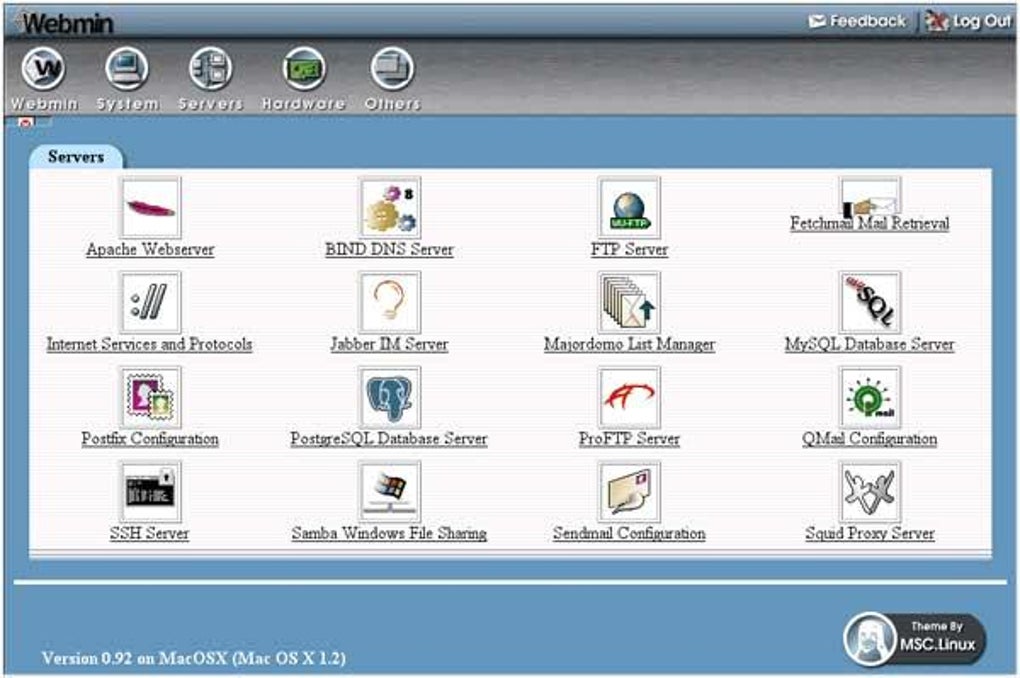
Webmin presents a clean, organized interface divided into categories and submodules, each dedicated to a specific system function. Navigation is intuitive, with a left-hand sidebar listing available modules such as “System,” “Networking,” “Users and Groups,” and “Webmin.” Clicking a module opens a form-based configuration panel, where settings can be adjusted with real-time feedback and validation.
Workflow efficiency is enhanced by consistent layout patterns, clear labeling, and contextual help links. Tasks like creating a new user or modifying a network interface are completed in a few clicks, reducing the time required compared to manual command-line execution. The interface is responsive and adapts well to various screen sizes, although it does not support mobile devices with full functionality.
Performance observations are based on general software behavior patterns. The developer did not specify resource usage details. However, as a web-based application, Webmin’s CPU and RAM consumption depends on the number of active modules and concurrent users. Stability is maintained through regular updates and a mature codebase, with minimal reported crashes in standard usage scenarios.
Compatibility & System Requirements
Webmin is compatible with Linux and Unix-based operating systems. It supports a wide range of distributions, including Debian, Ubuntu, CentOS, Red Hat, and FreeBSD. The software requires a web server (such as Apache or Nginx) and a Perl interpreter to run, as it is written in Perl.
The installation size is 42 MB, which includes the core application and default modules. Exact system requirements were not listed. The developer did not provide additional system requirements. Users should ensure their system has sufficient disk space and meets the minimum specifications for the underlying operating system. For production environments, it is recommended to run Webmin on a dedicated or isolated server to maintain security and performance.
Pros and Cons
Pros
- Free and open-source software with no licensing fees.
- Web-based access enables remote management from any device with a browser.
- Extensive module library for managing diverse system components.
- Intuitive interface reduces the learning curve for new administrators.
- Supports role-based access control for secure multi-user environments.
- Regular updates and active community support.
Cons
- Requires a web server and Perl interpreter to be installed and configured.
- Not optimized for mobile devices; limited functionality on smaller screens.
- Security depends on proper configuration and strong authentication.
- Some advanced features may require technical knowledge to use effectively.
- Interface design is functional but not modern by contemporary web standards.
FAQ Section
Is Webmin available for Windows?
Webmin is designed for Unix-like systems, including Linux and Unix. It is not natively supported on Windows. However, it can be run on Windows using compatibility layers such as WSL (Windows Subsystem for Linux), though this is not officially endorsed.
Is Webmin secure to use?
Webmin uses HTTPS encryption to secure communication between the browser and server. However, security depends on proper configuration, including strong passwords, regular updates, and firewall rules. It is recommended to restrict access to trusted IP addresses and avoid exposing the interface directly to the public internet.
How often are updates released?
Updates are released periodically, with the latest version, 2.2, published on April 15, 2024. The development team maintains an active release cycle to address bugs, improve functionality, and enhance security.
What license type does Webmin use?
Webmin is distributed under the BSD 3-Clause License, which allows free use, modification, and distribution for both personal and commercial purposes, provided the original copyright notice is included.
Can Webmin be used offline?
Yes, Webmin can be used offline once installed and configured. The web interface operates locally on the server, so no internet connection is required for routine management tasks. However, online access is needed for updates and external service integrations.
Final Thoughts
Webmin remains a powerful and reliable solution for system administrators managing Unix-like environments. Its web-based interface, extensive feature set, and long-standing reputation make it a top choice for both small-scale setups and enterprise-level deployments. While the interface may not reflect modern design trends, its functionality and stability are unmatched in the free system administration space.
Professionals who need a flexible, secure, and centralized way to manage Linux and Unix systems will find Webmin indispensable. Whether managing a single server or a fleet of remote machines, the tool delivers consistent performance and broad compatibility. With a free license and ongoing development, it offers exceptional value.
Download Webmin now







